


Tana: Manga & Comics
3.71.00 Reviews
App Specs
- Version
- 1.0.10
- Updated On
- License
- Free
- Downloads
- 100,000+
- Developer
- VibeDrama Studios
- Categories
- Comics
- Platform
- Android
Screenshots
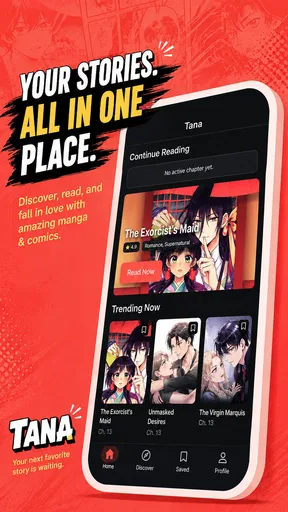

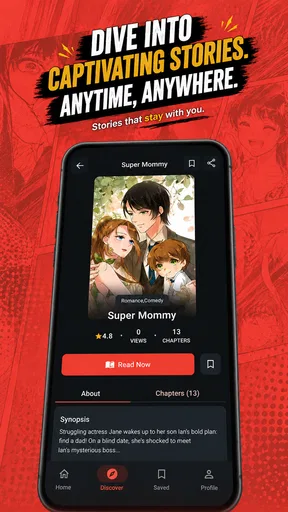
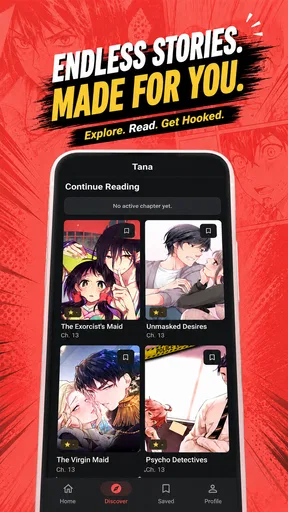

 Analysis by AppCompare
When I want to read manga in short bursts, the biggest nuisance is usually not finding something to open; it is keeping track of where I stopped and remembering to check for the next chapter. Tana: Manga & Comics is aimed at that everyday routine. It is a free manga-reading app from VibeDrama Studios, with favorites and new-chapter discovery built into the basic idea. I see its appeal less as a promise of an enormous reading platform and more as a convenient place to pick up a series, keep it close, and return later.
How I would fit it into a busy day
The app makes most sense when I have a small window to read rather than an evening set aside for a long session. I might open it during a lunch break, choose a series I already know, and use the saved list to avoid spending that short break searching again. That is a different kind of value from a huge storefront: the useful outcome is getting from “I have a few minutes” to a story without much planning.
For a reader who is just starting with manga, I would use the same approach but keep the first experiment narrow. Pick one title that sounds appealing, see whether its pages are comfortable to follow on your phone, and decide whether the app earns a spot in your routine. There is little reason to migrate a whole collection before finding out whether the central read-and-return loop feels right.
From choosing a series to settling in
I find the most useful way to judge a manga app is to follow one title from the moment I look for it to the next time I want to read. In this section, I’d focus on whether that path feels easy to repeat, rather than trying to build a large library right away. A small trial also makes it clearer which parts of the routine matter most before deciding how Tana fits alongside other readers.
A useful starting point for casual reading
If you are new to Tana, the sensible first step is to treat it as a reader rather than assume it is a complete comics library with every title you might want. Its focus is manga, and the store name presents it alongside comics, but the main practical loop is straightforward: find a series, read, and bookmark what you want to revisit. That makes it easy to understand without needing a complicated setup or a particular reading habit.
I would start with one series I already follow, rather than trying to move my whole reading life into a new app at once. That gives me a quick test of the things that matter day to day: whether I can locate the title, whether reading feels comfortable on my phone, and whether the bookmark workflow makes it easy to return. If those basics suit me, I can gradually make it part of my regular routine.
The app has a 3.7 average from around 645 ratings, and it has passed 100,000 installs. Those figures suggest there is a real audience, while the rating also encourages a measured expectation: I would try it for myself instead of assuming it will suit every reader. The content rating is Teen, so it is intended for teen audiences and up; parents should still make their own choices about what a young reader opens.
Worth Reading Before You Choose

Baby Panda World Brings Quick Play to Modern Phones, but Its Game Library Feels Busy

ESPN’s Live Game View Makes Following Close Games Easier

QuizzLand Review: A Good Fit for Short Trivia Breaks, Not Every Player

Basketball Stars: Multiplayer Is Fast, but Can It Recover When Matches Go Wrong?

WEBTOON Turns Phone Updates Into a Better Reading Routine

Link to Windows Runs on Shared Habits, Not Social Feeds
Making a reading session easier to resume
Once I have a series in mind, bookmarking is the feature I would use as a small piece of personal organization. It helps separate “I want to read this” from the titles I am only browsing, and it gives me a place to return when I have a few spare minutes. That is especially useful if I switch between a long-running story and something I am only sampling.
A practical habit is to bookmark a title as soon as I decide to follow it, then check that list when I have time to read rather than searching from scratch each session. This is not just tidier; it reduces the chance that a series disappears from my attention during a busy week. If I am testing several stories, I would keep the list selective and remove titles I no longer intend to continue. A shorter list is easier to use than a dumping ground.
For a realistic example, imagine waiting for a bus after work. I can open the app, return to a saved series, read for a few minutes, and leave with a clear reminder of what I want to revisit. The value is in reducing the small bits of friction around a reading break. I would not count on a bookmark alone to remember an exact panel or chapter position unless the app makes that behavior clear in use, so I would note my stopping point mentally if I were switching devices or juggling multiple series.
Keeping up without turning reading into a chore
Tana also centers the possibility of catching new chapters. For an ongoing manga, that can make a lightweight routine: check the series you follow, see whether there is something new, and read when the timing suits you. I like that this makes the app relevant after the first session, rather than only useful as a one-time place to browse.
There is a trade-off, though. A chapter-focused routine works best when the titles I care about are easy to find and updates appear in a way I can recognize. If I follow a series casually, I may only check now and then; if I follow many, I will want to avoid letting notifications or update checks dictate my free time. I would treat chapter discovery as a convenience, not a reason to keep opening the app throughout the day.
Choosing what belongs in the reading list
One useful way to keep the workflow low-effort is to separate browsing from following. When I am curious about a new series, I can sample it first and only bookmark it once I know I want to return. That avoids turning a moment of curiosity into a crowded list I have to maintain. If I already have several ongoing stories, I would also avoid adding every interesting-looking title at once; a small queue makes it easier to notice which series are actually holding my attention.
This approach also helps answer a practical question: is Tana better for discovering manga or keeping up with a set of favorites? I would judge it primarily by the second job. Chapter discovery may help me notice what to read, but the more dependable routine is to arrive with a few titles in mind and use the app to return to them. Readers who want browsing to do all the work of finding their next obsession may prefer a service with a broader discovery or editorial experience.
Where the app fits among manga readers
Compared with the usual alternatives, Tana’s described strengths are simple: it is free, focused on manga reading, and pairs reading with bookmarks and chapter discovery. That may suit someone who wants a dedicated reading space without paying just to test the experience. It is also a reasonable option for a reader who prefers to keep a small set of current favorites rather than organize a sprawling collection.
Readers who already rely on a particular publisher’s official app may be better off staying there for that publisher’s catalog and account-based reading habits. Someone who wants a broad digital comics subscription, a carefully curated storefront, or extensive library-management tools should compare those services before switching. Tana’s core promise is narrower, and that can be a virtue when all I need is a place to read and keep track of selected manga—but it is not the same thing as a guarantee of every title or a replacement for every comics service.
The choice also depends on how I like to read. A publisher app can be the clearer choice when my priority is a known catalog, while a subscription service may suit someone who wants a wide rotating shelf under one plan. A more customizable reader may be preferable if display controls, detailed sorting, or a specific reading layout are essential. Tana’s appeal is that it keeps the job simple; the trade-off is that readers with specialized habits should compare their must-haves before settling in.
The handoff between sessions
The most important handoff in a reading app is the moment I put my phone down and later try to continue. Bookmarks help with the series-level handoff: they remind me what I meant to read. The next part is whether returning to an episode feels direct and whether my reading position is easy to recover. I would test that before making Tana my only reader, especially if I tend to stop mid-chapter or move between devices.
My low-effort test would be to open a title, read a little, leave the app, and come back later. Then I would try the same with a second series and see whether the favorites list still feels manageable. This tells me more than browsing a large number of titles in one sitting, because it checks the actual workflow I will repeat. If returning takes too much hunting, the convenience of a bookmark loses some of its value.
Another useful habit is to make the app part of a clear transition: finish a chapter, save the series if I plan to continue, then close it. That small routine avoids relying on memory when I have several stories in progress. It is a practical workaround for any reader whose attention is split between work, commuting, and other entertainment, and it does not require elaborate tracking.
What can interrupt the flow
The obvious limitation is that a short store summary cannot tell me whether the selection matches my taste. A manga reader is only as useful as the stories I can actually find and read in it. I would check for a few specific titles before investing time in building a favorites list. If my must-read series are not there, no amount of bookmarking makes it the right primary app.
Reading comfort is another personal test. Phone screens vary, and manga pages can be harder to follow when panels are dense or lettering is small. I would try a page from a series I know well, because familiar artwork makes it easier to notice whether the layout feels comfortable. If I regularly read for long stretches, a tablet or a reader with controls and display options that suit me better may be a better fit.
There is also a difference between finding a new chapter and being able to read it when I want. Readers who need offline access for travel, detailed sorting, or a specific page-turn style should confirm those parts of the experience before depending on the app. I would not plan a long commute around an assumed capability; I would test the actual setup at home first. That is a small precaution, but it prevents a reading routine from breaking at the least convenient moment.
That makes a short trial more useful than an immediate switch. I would check the catalog against the series I actually care about, read long enough to notice whether the page presentation works for me, and then leave and return to see how the handoff behaves. If any one of those steps feels awkward, I can keep Tana as a secondary reader rather than expecting it to replace an app that already handles that need well.
Who I would recommend it to
I would recommend giving Tana a try if you read manga on your phone, want a free starting point, and value a simple way to keep favorite series within reach. It is especially appealing to casual readers who dip in during breaks and do not want to rebuild a reading list every time they return. The current version is 1.0.10, and the minimum operating-system requirement is Android 7.0, so device compatibility is worth checking before installing.
I would be more cautious if I depend on a particular catalog, need advanced library controls, or expect a fully settled experience across every part of a long reading workflow. VibeDrama Studios has positioned Tana around reading, bookmarking, and new-chapter discovery; that gives it a clear job, but each reader should check whether that job matches their own habits. Its modest average rating is another reason to treat a quick personal trial as more useful than a blanket recommendation.
For someone who reads on a phone in small gaps, the free entry point makes that trial easy to justify. For a reader who values a specific publisher’s releases, reads mostly on a large screen, or needs a carefully managed library, I would start with the service that already meets those needs. Tana is more convincing as a simple place to keep a few manga in rotation than as an all-purpose answer to every comics-reading preference.
Overall, Tana: Manga & Comics makes most sense as a low-commitment reader for keeping a few manga series in rotation. My suggested workflow is simple: test a title you care about, bookmark it, leave the app, and see how smoothly you can pick it up again. If that loop feels natural and the available reading suits you, Tana can earn a place in your everyday routine. If the catalog or handoff between sessions gets in your way, a publisher-specific reader or a more feature-rich comics service will be the better choice.
Pros
- Combines manga and comic reading in one app.
- Useful for readers who enjoy exploring different series.
- A dedicated library can make it easier to keep track of titles.
- Reading on a phone or tablet is convenient for short sessions.
- May offer a simple alternative to juggling multiple reading apps.
Cons
- The available catalog may vary by region.
- Some titles or features may require a paid plan.
- Reading comfort depends on screen size and display settings.
- A stable internet connection may be needed for browsing or reading.
- Readers may not find every series or publisher they are looking for.
FAQs for Tana: Manga & Comics
What is Tana: Manga & Comics?
Tana: Manga & Comics is a mobile reading app for people who enjoy manga and comics on their phones. It brings reading material together in a digital format, so you can browse available titles and open a series to read. The exact catalog and features may change over time, so check the app’s listing and in-app information to confirm what is currently available in your region.
Is Tana: Manga & Comics free to download and use?
The app may be free to install, but that does not necessarily mean every title or feature is free to access. Some reading apps offer optional purchases, subscriptions, advertisements, or other paid features, and their pricing can vary by country and change over time. Before paying, review the store listing and the purchase details shown in the app, including any renewal terms for subscriptions.
Can I read manga and comics offline with Tana?
Offline reading depends on whether Tana provides a download or save-for-later option for the titles you want to read. If downloads are available, you may need an internet connection to save chapters first, and downloaded content could be limited by storage, licensing, or account settings. Check the reading controls and app settings before relying on offline access during travel or when you have no connection.
Is Tana: Manga & Comics available on Android and iOS?
Availability can differ between Android and iOS, as well as between countries and devices. Search for the exact app name in Google Play or the Apple App Store and confirm that the developer and app details match before installing. Also check the listed minimum operating-system requirements, since an older phone or tablet may not support the current version even if the app appears in the store.
Is Tana: Manga & Comics safe, and what should I check before installing it?
Install Tana through an official app store whenever possible, and review its developer information, recent updates, ratings, and privacy disclosures before downloading. Pay attention to the permissions it requests and whether they make sense for a reading app; you can often deny optional permissions in your device settings. For purchases, use the store’s payment flow and check the app’s privacy policy and account terms.


